
Overview
Conexiom uses its proprietary AI and machine-learning system to generate Sold-To-ID recommendations to match the current trading partner.
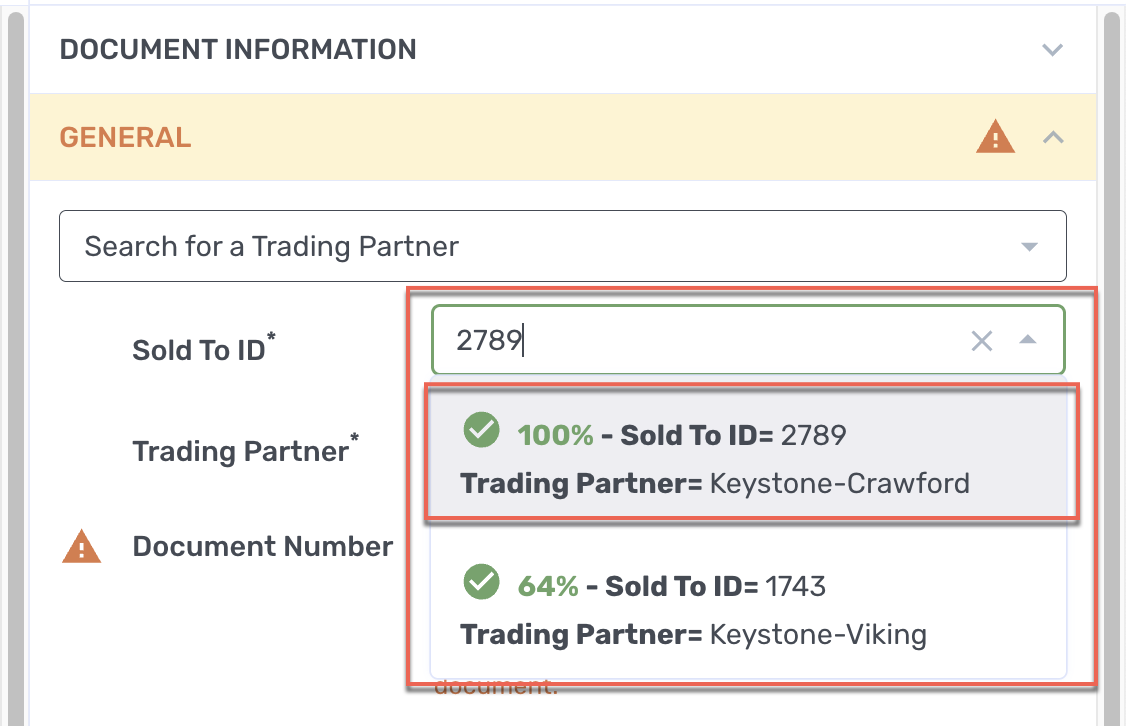
For each document you process, Express can return up to five recommended Sold-to IDs, based on previously processed documents, each paired with an AI confidence score that displays in order from a drop-down menu when you click it. When confidence scores are close, you can quickly review the options and choose the correct one.
Note: Each trading partner can only be linked to one Sold-To ID, making each unique, so duplicate pairs are not permitted.
The option that is best suited in terms of its confidence score and the trading partner will likely populate the field, which is at the top of the list’s display. However, if you choose a different listing, the new listing will remain preferred for subsequent documents.
A warning message that asks for manual review displays under two different conditions:
-
When there are multiple AI confidence scores above the confidence score you have configured. For example, if your confidence threshold is set to 90%, and the system finds one Sold to ID is 95.5% and another at 94.5%, then it calls your attention for review to ensure the best Sold to ID is selected.
-
When a Sold To ID is below the confidence threshold you have configured. Additionally, the system alerts you with a message when multiple listed values exceed the confidence threshold.
If no recommendations are populated automatically in the Sold-to ID field, the Trading Partner field, or both, follow the steps under Supplying Missing Entries, directly below.
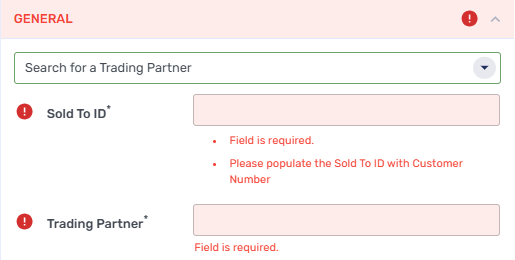
Supplying Missing Entries
If a document cannot automatically fill in the Sold-to ID field, the Trading Partner field, or both, follow these steps:
-
If the Sold-to ID field is empty, or both the Sold-to ID and the Trading Partner field is empty, click on the Sold-to ID field. A dropdown menu displays.
-
From the dropdown menu, possible matches for the Sold-to ID display, along with a confidence score to help you choose the best selection. When the confidence score is very high, the system preselects that choice, however, you may make a different selection. After you make the selection, the system fills in the trading partner that has been paired with it.
Note: If you believe that the system has not provided the correct information, you can fill in the fields by entering the correct information.
Note: Both Trading Partner and Sold-to fields are required.
Once provided, the system does the following:
-
Stores the association where it can be used to recognize and process future documents that have a similar structure.
-
Improves field predictions that rely on this stored pair, improving speed and accuracy.
If for any reason you need to change the pairing between the trading partner and the Sold-to ID, contact Support.
For more information on Express’s features, see Using Express.