
Conexiom Express supports the processing of unstructured documents, including scanned documents, handwritten documents, and documents where key information appears directly in the email body rather than in a structured attachment.
What Is an Unstructured Document?
An unstructured document does not follow a consistent layout. These documents may:
-
Lack clearly defined sections
-
Be scanned or handwritten
-
Contain free‑form text
-
Include key details directly in the email body
For reference, a structured document typically includes clear header, line, and footer sections.
This article focuses only on unstructured documents.
See Supported Document Formats and Languages in Express for more information on accepted document formats.
Working with Unstructured Documents
Unstructured documents use the same Express workflow as other documents.
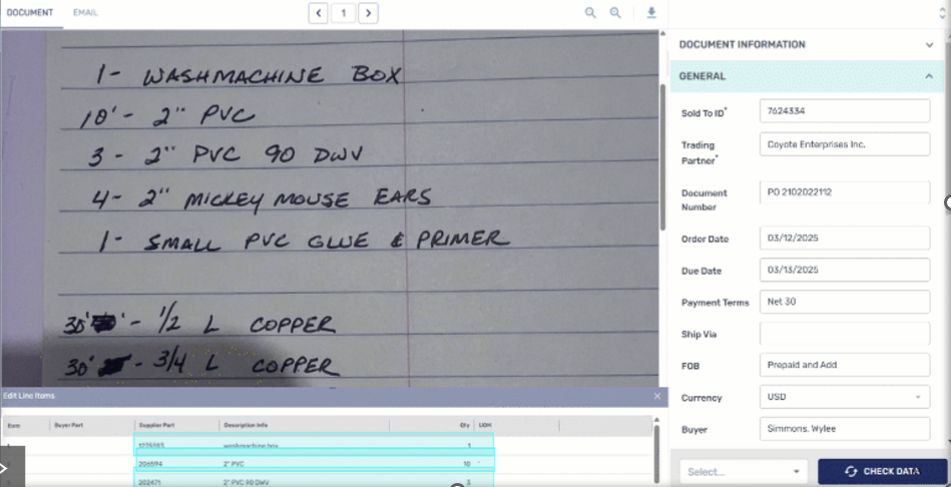
They appear in the left‑hand document preview, where you can:
-
Review scanned, handwritten, or email‑body content
-
Highlight and select data
-
Transfer data into the form fields on the right
-
Correct missing or incorrect fields to teach the AI
You can review all extracted data before approval, and the AI learns from approved unstructured documents over time.
Review and Approval
The review process follows the standard Express flow:
-
The document is processed by Express.
-
AI extracts available data from the unstructured content.
-
You review and update the data as needed.
-
Documents may be flagged if confidence is low or review is required.
-
Once approved, the document is sent to your system in the configured output format.
Supported Languages
Unstructured documents are supported in the following languages:
-
Czech (CS)
-
German (DE)
-
English (EN)
-
Spanish (ES)
-
French (FR)
-
Hungarian (HU)
-
Italian (IT)
-
Dutch (NL)
-
Polish (PL)
-
Portuguese (PT)
-
Romanian (RO)
-
Slovak (SK)
-
Swedish (SV) (enablement required)