
How Configuration Studio recognizes the Header, Line Items, and Footer sections of each document.
Document Sections in Configuration Studio
Configuration Studio recognizes the Header, Line Items, and Footer sections of a document. The following describes how each behaves across single and multi-page layouts and how extraction levels affect data extraction.
Each document processed by the system is divided into three main sections:
-
Header – Typically contains document-level data such as order number, customer ID, or date.
-
Line Items – Contains line-level data such as part numbers, quantities, or prices.
-
Footer – Usually includes document-level totals or closing fields.
These sections help the system identify and extract relevant data accurately. Each one is structured as a table and is mapped at a specific level.
Extraction Levels
|
Section |
Recognized As |
|---|---|
|
Header |
Document Level |
|
Line Items |
Line Level |
|
Footer |
Document Level |
Note: In some cases, document-level data may be mapped at the line level.
How Sections Display in Multi-Page Documents
The presence of headers and footers varies, depending on the number of pages in the document. This distribution ensures accurate data extraction.
Verification Order
The system verifies sections in the following order:
-
Header Section
-
Footer Section
-
Line Item Section
Note: Each section is validated, based on whether mandatory elements are present. Optional elements may be missing without causing failure.
Section Details
1. Header Section
-
Header 1: Applies only to Page 1.
-
Header Empty: Applies to all pages except Page 1.
-
You can define multiple versions (e.g., Header Empty 1, 2, 3).
-
The engine checks them in the defined order.
-
2. Footer Section
-
Footer 1: Applies only to the last page.
-
Footer Empty: Applies to all pages except the last page.
-
Multiple versions allowed (e.g., Footer Empty 1, 2, 3).
-
Checked in order.
-
3. Line Item Section
-
Applies to all pages.
-
Verified after headers and footers.
The diagram illustrates how headers and footers are distributed across documents of varying lengths:
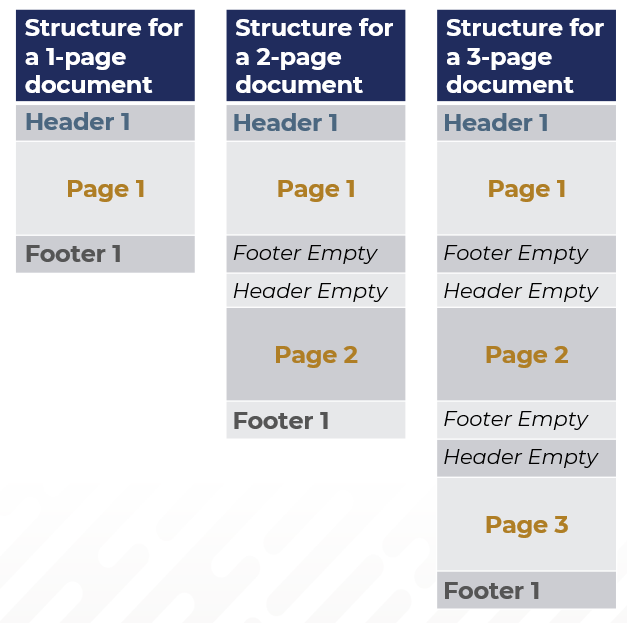
Document-level data comes from the first and last page, while line-level data spans all pages.
For more information see: